
We have all wanted to create professional looking posters at a point. It can be for a business or for you personal needs like Birthday Cards or Invites.
Canva is a publishing tool that helps create professional-looking posters, flyers, social media posts, and many more templates to choose from. Canva has many features that make it a good option for people who have no experience creating something like this. It has a very simple user interface which makes it easy to use compared to other professional tools.
To get started first, you need to visit canva.com and sign up for an account. Canva has 2 models of subscription, the first which is free and the other a paid pro version.
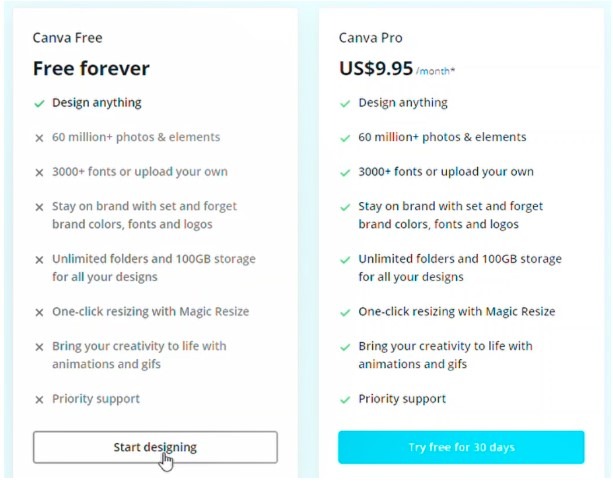
Here we are going to look into the free version and all the features it provides.
Once you are logged in you will see a homepage with various templates and options to choose from.
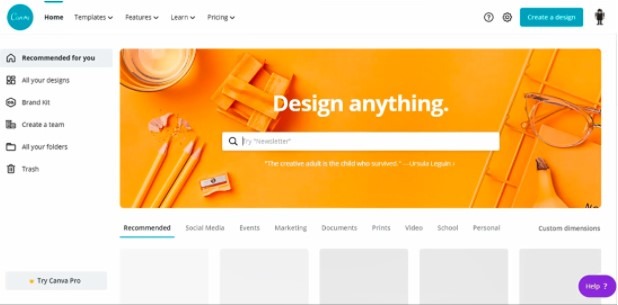
Here you can see templates tailored to various uses and social media platforms. You also have the option to create a poster from scratch with Custom dimensions within the Create a design option.
From here you can add in your custom height and width for your poster and proceed. Then you will see a page where you can now edit your poster.
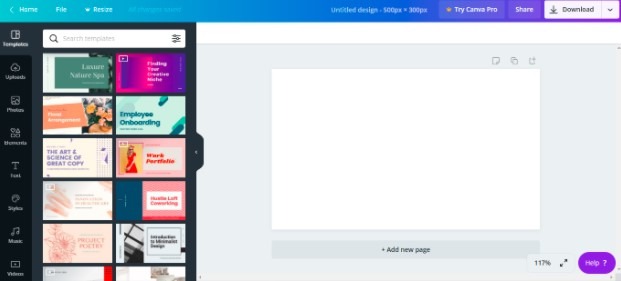
Now we can see our canvas on which we can work on. On the top banner you have the option to go back to your homepage, a file option having a few options for you to work with similar to what you find in an MS Office tool. Then a resize option which is only available for people with the pro version which is paid, then an undo button and on the right side you have a share option you can use to share your work with others, and then you have a download option. Next to the download button, we have an arrow button which gives you more options like publishing straight to a social media site or email it to someone and many other features which you may find useful. Moving on to the left of the screen you can see the variety of options and features you may use to create your canvas. You have the option to choose from a variety of templates from canva, you can also upload whatever you want to set to your canvas if you have an image on your computer or you can choose from canva’s library of photos. You can also set a tiny element from canva’s library of shapes and lines and some quirky stickers which gives your canvas some flair to it. Then there is a text option with a variety of text options in various fonts and formats. Then you have the option to add music and videos from canva’s library.
If you are looking to add a background to your canvas you can select from a variety of different background images within canva.
These are some of the tools you can use in canva to help you create almost anything you want.


I’m truly impressed with your deep insights and stellar ability to convey information. The knowledge you share clearly stands out in every piece you write. It’s evident that you spend considerable time into delving into your topics, and the results pays off. We appreciate your efforts in sharing this valuable knowledge. Keep on enlightening us! https://www.elevenviral.com
I’m thoroughly captivated by your keen analysis and superb writing style. The knowledge you share shines through in every sentence. It’s obvious that you put a lot of effort into delving into your topics, and this effort does not go unnoticed. Thanks for providing such valuable insights. Continue the excellent job! https://www.elevenviral.com
I’m truly impressed with your keen analysis and superb writing style. Your depth of knowledge clearly stands out in each paragraph. It’s obvious that you invest a great deal of effort into researching your topics, and this effort does not go unnoticed. Thank you for sharing such valuable insights. Continue the excellent job! https://rochellemaize.com